Tyme - All Features
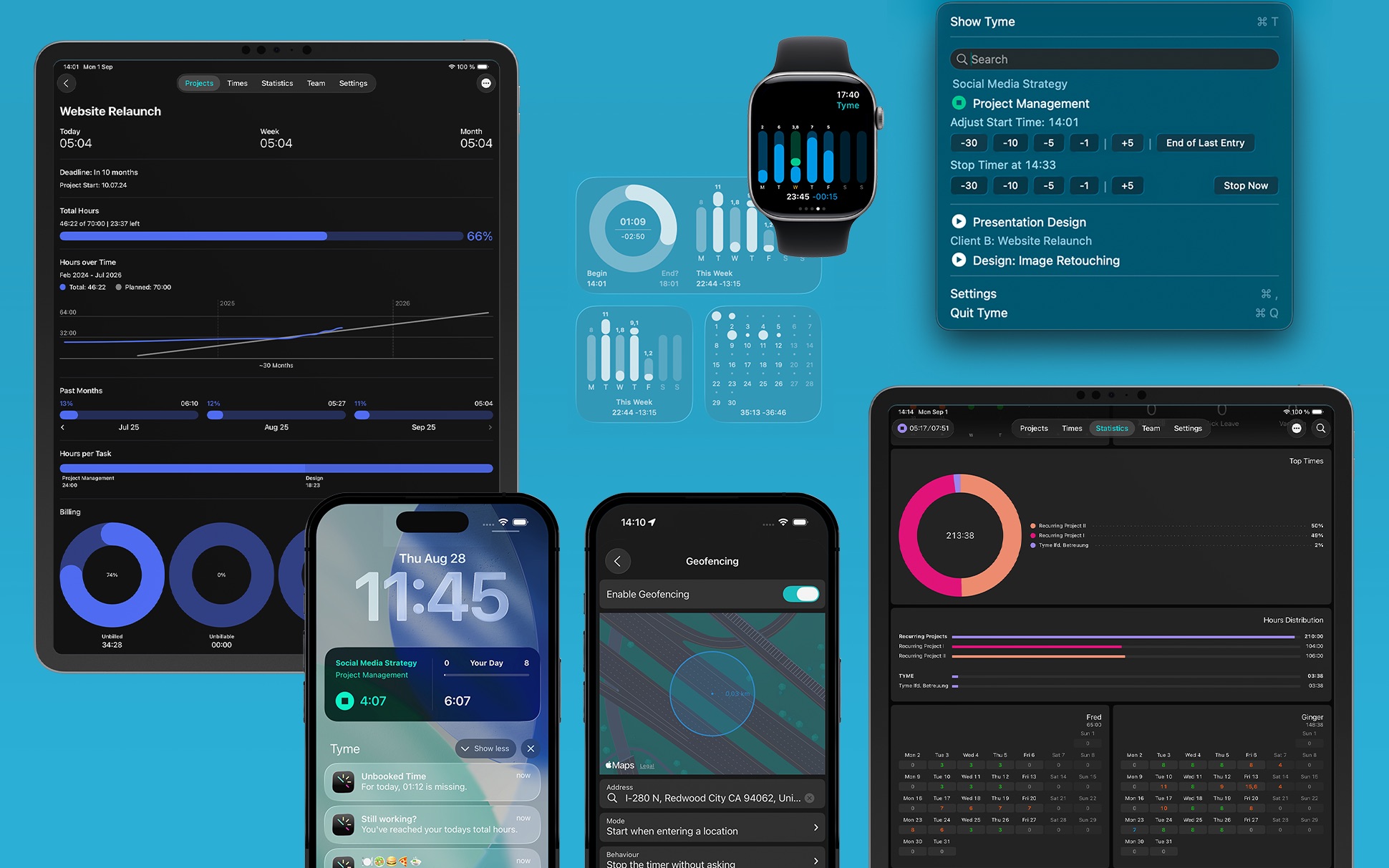
Below you find a complete feature set of Tyme. If you have any questions or think there is a feature that would make Tyme even better, contact us.
Platforms:
- native Apps for: Mac (13 Ventura, 14 Sonoma, 15 Sequoia, 26 Tahoe, 27 Golden Gate)
- native Apps for: iPhone & iPad (iOS 18, 26, 27)
- native Apps for: Apple Watch (watchOS 10, 11, 26, 27)
- Web (Safari, Chrome, Firefox, Microsoft Edge, Android, etc.)
Project & Tasks:
- Starting date
- Due date
- Individual colors
- Hourly rates
- Planned time
- Planned budget
- Recurring budgets: reset daily, weekly, monthly or yearly — ideal for retainers
- Project defaults: hourly rate & rounding rule, inherited by new tasks
- Use categories to group projects
- Time rounding options
- Billable / Non-billable
- Notes
- Sub-tasks
- Completed tasks lock their rate & rounding, so past totals never change
- Project archive
Color Coding:
- Select from a predefined set of 8 colors
- Choose custom colors
- Color coding is reflected in the entire interface
Time Tracking:
- Start Timers
- Stop Timers
- Adjust running Timers
- Assign timers to new tasks
- Backdate a timer's start time, or stop a timer as if it ended earlier
- Slot Tracking Mode: Individual time entries with start- and end times
- Cluster Tracking Mode: One time entry per task & day. Only duration is tracked
- Automatic time-out if you don't use your Mac
Automatic Time Tracking via Your Location:
- Up to 20 work locations (Geofences)
- Minimum stay duration
- Starts timer when entering a location
- Stops timer when leaving a location
- Reverse Mode: Start timer when leaving a location
Expense, Fixed Cost and Flat Rate Tracking:
- Create expenses, fixed costs and flat rates
- Arrange them in groups
Mileage Tracking:
- Automatically track travel times
- Define Kilometer / Mile rates
- Start & end addresses captured automatically
Planning:
- Visualization of planned time per project
- Visualization of available time
- Dashboard view per project or category: actual vs. planned, plus a billed / paid / unbilled breakdown
Search & Filter:
- Global search across projects, tasks and notes
- Filter by active or archived state, and by task type
- Filter by billable / non-billable, and by billing state
- Filter by team member, or just your own items
- Combine filters with a custom date range
Time Sheets & Reports:
- Customizable PDF timesheets
- PDF Worksheet: a compact daily or period overview including breaks and overtime
- PDF Project Report: a client-facing summary grouped by billable status
- CSV & JSON export
- PDF Export
- Live preview
- Customize header
- Customize footer
- Portrait & landscape format
- Export individual entries, or clustered into one row per task and day
Statistics & Insights:
- Worked hours per day
- Worked hours per day per team member
- Workload per day
- Distribution of hours in projects
- Heat map of your daily activity
- Group totals by category, project, task or sub-task
- Average working hours
- Breaks
- Overtime / Undertime
- Non billable times
- Trips / Travel times
- Custom date ranges
Calendar:
- Recorded times can be synced with a calendar
- Calendar entries can be modified and re-arranged and sync back
Sync:
- All data syncs with all your devices using iCloud
- All team data syncs to your team and all devices using our team server
Backup & Undo:
- Undo & Redo all actions (Create, Modify, Delete)
- Undo also available for the iPhone & iPad app
- Automatic backups of all data each day
- Restore from backups
Reminders:
- Deadlines
- Budget
- Planned hours
- Daily working hours reached
- Start tracking
- Stop working
- Unbooked times
- Take breaks
- Lunch break
- Trial ending
Global Keyboard Shortcuts:
- Start & Stop timers from any application
- Show & hide Tyme from any application
- Toggle the menu bar popup from any application
- Add a time entry from any application
- Edit & Add notes for running timers from any application
Siri & Shortcuts App Integration:
- Ask Siri to start or stop a timer, log a time entry, or tell you how many hours you've worked
- Add categories, projects, tasks and time entries
- Delete categories, projects, tasks and time entries
- Search & retrieve categories, projects, tasks, time entries and team members
- Update values of categories, projects, tasks and time entries
- Bulk-update or bulk-delete several items in one step
- Start & stop timers
- Add notes to running timers
- Get working times of today, this week or this month
- Time entries are individually searchable in Spotlight
- Shortcut Triggers: run a shortcut when a timer starts or stops, daily working hours are reached, a project is archived/de-archived or a task is completed
AI Assistant (MCP Server):
- Built-in Model Context Protocol server lets AI assistants, such as Claude, read and control your Tyme data
- Start & stop timers, log time, and query your working hours
- Build out categories, projects, tasks and subtasks
- Secured with a per-install authentication token
- Follows the same permissions as the app, so team members can only control their own data
Watch App:
- Start & Stop timers
- Active timers always pinned to the top of the list
- Complications
- Today, Week, Month Working Times
- Independent of iPhone app
Widgets
- Live Timer widget: shows your running task, or one-tap resume buttons for recent tasks when idle
- Today Widget
- This Week Widget
- This Month Widget
- Lock Screen widgets: Working Time, and Day Start/End
- macOS Notification Center widgets
- Forced light or dark appearance per widget, independent of your system setting
Importer:
- Import from previous versions (Tyme 1 & 2)
- Import from Tyme backups
- Import from CSV files (Ultimate Importer, supports most software)
- Import from Timings
- Import from mite
- Import from toggl
- Import from Clockify
- Import from Clockodo
- Import from Early (formerly Timeular)
- Import from Everhour
- Import from Harvest
- Import from Timely
- Import from OpenProject
- Import from Jira
Exporter
- Export to Lexware Office
- Export to GrandTotal
- Export to sevdesk
- Export to Billomat
- Export to WISO MeinBüro
- Export to FreshBooks
Plugins
- JavaScript interface for plugins to export and import data
- Community plugins: Raycast (start & stop tasks from the launcher), Hookmark (bookmarks for time entries, projects & tasks)
Integration:
- Automatic sync of time entries and billing states to GrandTotal
- Copy projects or time entries directly into GrandTotal from Tyme
- Import GrandTotal offers as ready-made projects and tasks
Automation
- 23 App Intents for Shortcuts, Siri and Spotlight
- Fully scriptable via AppleScript
tyme://URL scheme for deep links from emails, the web or other apps- Automate workflows with no-code tools like n8n and Zapier
Team Administration
- Create and manage users
- Roles: Admin & users
- Invite members by email
- Assign users to projects & tasks
- Per-member working hours, with history
- Team workload overview, including seat status
Settings:
- Light & Dark Mode
- Simultaneous or single timers
- Launch Tyme at login
- Ignore short time entries
- Menubar: Running time, daily total, current task
- Idle timeout
- Show note dialog when starting or stopping timers
- Time format: Hours, decimal or working days
- Currency for all projects
- Flexible working times
4.7

Start with a 14-day free trial.
Try Tyme
© 2026 – Tyme is a Unit Numberfive app.
Made with 🧡 in Hamburg, Germany